Platform
This part of the architecture is going to handle the communication between the devices and the board, it handle everything that is related to the hardware that is attach to the board, handles plugin integration and also expose a resource definition for the devices and plug-in.
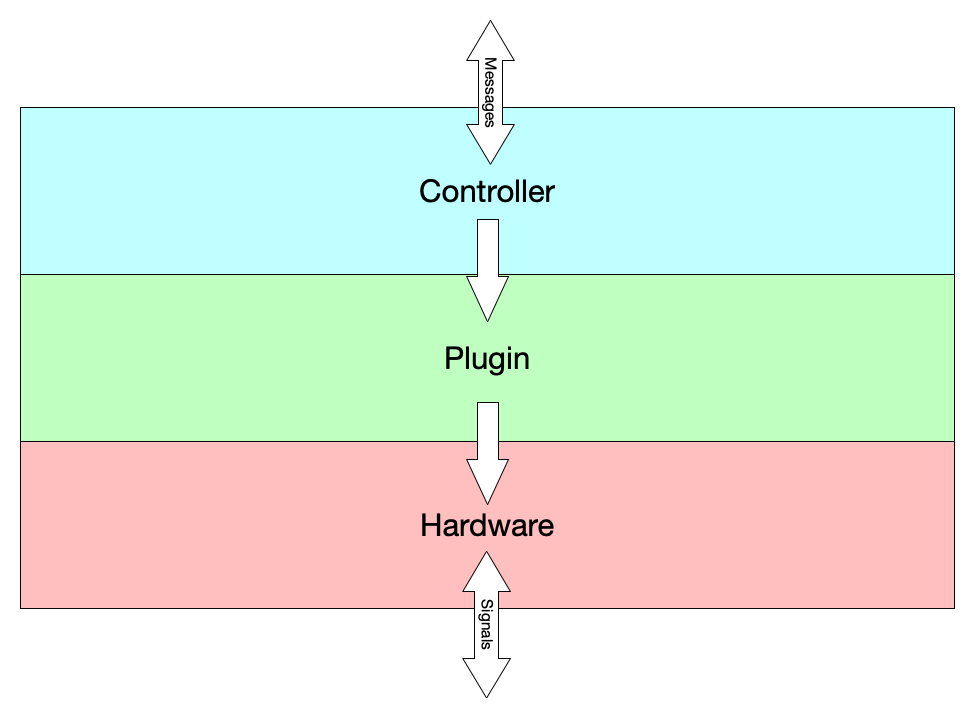
Hardware
The board is comes with a wifi and bluetooth chip, we are going to attach a Dongle Protocol Analyzer, Zigbee Packet Sniffer and z-wave plug-on module.
All the plugins have access to the hardware and each of them make their own implementation for whatever protocol they wish to talk.
Z-wave
This is module is going handle the integration with the z-wave devices, the board is going to use z-wave plug-on module.
Zigbee
This is a module that handles the integration with the Zigbee devices, the board is going to use the Dongle Protocol Analyzer, Zigbee Packet Sniffer.
Wi-fi
This modules handles the integration with wi-fi devices, the raspberry pi 4 comes with a wi-fi module in the board.
Bluetooth
This modules handles the integration with bluetooth devices, the raspberry pi 4 comes with a bluetooth module in the board.
Plug-In
This are the hearth and soul of the platform, they are like apps in a phone and are what adds functionality to the board, this are Go Plugins, which are dynamic libraries that run dynamically in the main system.
The plugins in Djinn consist on a .lamp file which is a zip file that includes the following files:
plugin.soconfig.ymlinfo.yml
Plug-in Entry point
All the plugins must to implement the Plugin interface, but they are free to implement this however they want.
This design uses the Lifecycle Pattern to describe a common language between the plugins and the controller, and between the plugin and the gateway.
type Plugin interface {
    // Lifecycle Methods
    // Installation Methods: Used by the Gateway when installing the plugin
    OnBeforeInstall() err
    OnInstall() err
    OnAfterInstall() err

    // Execution Methods: Used by the Controller when running the plugin
    OnBeforeRun() err
    OnRun() err
    OnAfterRun() err

    // Event Methods
    OnDiscover(id string, details string)
    OnChange(id string, details string)
    OnError(id string, details string)
    OnConfigurationChange()

    // Request Methods
    // Methods that are manually triggered by the user request
    Configuration(payload string) err
    Restart() err
    Subscribe(id string, event chan<- string) err
    Command(id string, command string, payload string) (string, err)
    State(id string) (string, err)
    Register(id string, payload string) (string, err)
    Discover() (string, err)
}
The file plugin.so is the entry point for the plugin, which the Controller is going to use to call the different lifecycle methods for running the application and the Gateway is going to call when installing and validating.
The payload and the return in GetState are json strings.
package main

type plugin struct

func (p plugin) OnBeforeInstall() err {
    // Lifecycle method that get's run when the plugin is going to be installed
}

func (p plugin) OnInstall() err {
    // Lifecycle method when the application is installing
}

func (p plugin) OnAfterInstall() err {
    // Lifecycle method that get's executed after install (Clean up)
}

func (p plugin) OnBeforeRun() err {
    // Lifecycle Method that get's executed before the application runs
}

func (p plugin) OnRun() err {
    // Method that get's execute when the plugin runs
}

func (p plugin) OnAfterRun() err {
    // Lifecycle methods that get's executed after the application finish running
}

func (p plugin) OnDiscover(id string, details string) {
    // Listener that get triggered when a new device is discovered
}

func (p plugin) OnChange(id string, details string) {
    // Listener that get triggered when a device change its state
}

func (p plugin) OnError(id string, err error) {
    // Listener that gets triggered when an error happened to a device
}

func (p plugin) OnConfigurationChange() {
    // Listener that gets triggered when the configuration file get's updated
}

func (p plugin) Configuration(payload string) err {
    // Method that change the existing configuration file
}

func (p plugin) Restart() err {
    // Method that restart the plugin
}

func (p plugin) Subscribe(id string, event chan<- string) err {
    // Method that creates a subscription for a device
}

func (p plugin) Command(id string, command string, payload string) (string, err) {
    // Sends a command to a particular device by it's id
}

func (p plugin) State(id string) (string, err) {
    // Request the state of a device
}

func (p plugin) Register(id string, payload string) (string, err) {
    // Register a new device to the board
}

func (p plugin) Discover() (string, err) {
    // Method that manually triggers a discovery
}

var Plugin plugin
Go Plugin Example explains how the controller and the gateway would load a plugin at runtime
Configuration file
The file config.yml stores the properties that the plugin required to run, for example mqtt addresses.
When the user is installing a plugin, Djinn uses this file to request the display of a page where the user can enter the information that the plugin requires, at this point the plugin lives in a temporary path.
Once the information is sent and is validated by a subroutine in the plugin, then the plugin source file gets to move to a permanent path and the plugin metadata gets stored in the database.
Each property in the configuration file describes what type of input is required and the interface uses this metadata to provide an appropriate input.
In the configuration file the section device_type describes the different types of devices that the plugin is able to control, their commands and the values required and what are the values of the state and the format.
# Configurations required to run the plugin
config:
  mqqt:
    type: string
    title: MQTT
    description: >
      MQTT address
    required: true
    regex: mqtt:\/\/(.)+
  api_key:
    type: string
    required: true
    title: "Api Key"
    description: >
      Phillips Developer Api key
    length: 45
  discovery_interval:
    type: number
    required: false
    range: true
    min_range: 1000
    max_range: 5000
device_type:
  # ID of the device type
  bulb:
    # Display name of the device in the platform
    name: "Bulbs"
    # List of all the commands that are supported by this device type
    commands:
      - TURN_ON
      - TURN_OFF
      - SET_INTENSITY
    # Object that describe how the state of the device is represented
    state:
      ligth:
        type: boolean
      intensity:
        type: number
        format: int
        range: true
        min_range: 0
        max_range: 100
    # Properties required for each command
    command_payload:
      TURN_ON:
        light:
          type: boolean
          value: true
      TURN_OFF:
        light:
          type: boolean
          value: false
      SET_INTENSITY:
        intensity:
          type: number
          format: int
  rgb_bulb:
    name: "RGB Bulbs"
    commands:
      - TURN_ON
      - TURN_OFF
      - SET_INTENSITY
      - SET_COLOR
    state:
      ligth:
        type: boolean
      intensity:
        type: number
        format: int
        range: true
        min_range: 0
        max_range: 100
      color:
        type: string
        format: hex
    command_payload:
      TURN_ON:
        light:
          required: true
          type: boolean
          value: true
      TURN_OFF:
        light:
          type: boolean
          value: false
      SET_INTENSITY:
        intensity:
          type: number
          format: int
      SET_COLOR:
        color:
          required: true
          type: string
          format: hex
Information file
The file info.yml is a file that describes the information of the plugin and the developer, this information is displayed to the user when it's installing the plugin so they know the origin and how to contact them to report bugs.
# Define the version of the plugin
version: 2.1
# Plugin Display name
name: Phillips Hue
# Name of the package (using Reverse Domain Name Notation)
package: com.phillips.hue.bulbs
# Short description of the plugin
abstract: Phillips hue bulbs simple control plugin
# Long Description of the plugin
description: >
  Plugin that controls all the bulbs on phillips hue ecosystem
# URL for the repository of the plugin
repository: https://github.com/djinn/hue
# Plugin website
website: https://bulbs.hue.phillips.com/support
# Contact email
email: [email protected]
# License
license: ISC
# Plugin authors
authors:
  - John Doe <[email protected]>
All the plugins are stored in a volume that is in the operating system that is also shared as a volume in k3s in the path /home/djinn/plugins/.
Djinn platform program is going to list all the plugins that exist in the path and load them dynamically, since golang can't unmount or do a hot reload of plugins that are installed every time a plugin is updated or removed k3s is going to restart the Djinn platform program so the changes are applied.
The plugins are going to follow the reverse domain name notation for their package name and directory.
Notation Examples
/home/djinn/plugins/com.phillips.hue.bulbs/home/djinn/plugins/com.phillips.hue.lamps/home/djinn/plugins/com.lifx.strips/home/djinn/plugins/com.lifx.bulbs/home/djinn/plugins/com.wyze.scale/home/djinn/plugins/com.google
The reason for this naming convention is that it gives the maintainers the flexibility to maintain their plugins in different ways, they can create one big plugin to support all the devices or create different plugins for each product line.
Go plugins only work on Unix-based systems like macOS or Linux, since we are already providing the hardware and the installation this is not going to be an issue since we are using Linux on the board.
Controller
The controller is a module that handles the communication between the plugins and the rest of the system, once a plugin is installed is going to stores the plugin metadata and configuration into the persistence layer.
Each plugin is going to provide a resource definition for the:
- The devices that it controls
- The plugin itself
Additionally to these resources the controller also works as a gatekeeper for other resources that exist within the board like control access and device grouping.